BetTrackr Premium
Premium adds the tools that remove the manual work from bet tracking.
New accounts get a 7-day free trial · Cancel anytime · Compare Standard and Premium

Bonusbank Exclusive: Your First 30 Days Free
Choose a plan below – your free 30 days are applied automatically at checkout.
First-time subscribers only – available once per account.
Bonusbank Partner Offer
The 30-day free offer is for first-time subscribers without an existing linked Bonusbank account, so it can't be applied to your account – checkout will show standard pricing.

Annual Plan (Save 22%)
$119.95 /year
Unlock BetTrackr Premium - get full access to our powerful Chrome extension plus premium tools to make your bet tracking smarter, faster, and effortless.
New here? Create an accountMonthly Plan
$12.95 /month
Unlock BetTrackr Premium - get full access to our powerful Chrome extension plus premium tools to make your bet tracking smarter, faster, and effortless.
New here? Create an account
Trusted by Bonusbank
BetTrackr is proud to partner with Bonusbank – the bet tracker they recommend to their members.
Enterprise Solution
We offer enterprise solutions for businesses, including API access.
Tell us what you need and we'll get back to you.
Contact Us
Standard vs Premium
Standard is free forever. Premium adds the tools below.
| Feature | Standard | Premium |
|---|---|---|
| Premium tools | ||
| Chrome Extension: track bets from bookmaker sites automatically | - | |
| Trending: popular markets, races and promotions | - | |
| Back/Lay Calculator | - | |
| Black Book: your personal watchlist of runners, with alerts when they race next | - | |
| Journal: record thoughts and reflections alongside your betting record | - | |
| PDF bet reports: monthly, annual and more | - | |
| Tracking | ||
| Unlimited bets and bookmaker accounts | ||
| Dashboard and analytics: profit, ROI, turnover, win rate and more | ||
| Bonus bet tracking with expiry reminders | ||
| Calendar, events and custom tags | ||
| Automation | ||
| Betfair auto-sync and auto-resulting | ||
| Import from Bonusbank, Sportsbet and CSV | ||
Track Bets automatically
Install the BetTrackr Chrome Extension and record bets directly from your bookmaker's website. No more switching tabs or copying details manually.
- One-click tracking: capture bets as you place them
- Popup dashboard: view stats without leaving the page
- Balance sync: see your bookmaker balances at a glance
- Back/Lay calculator: work out stakes on the fly
Works on: Sportsbet, TAB, Betfair, Ladbrokes, Neds, Bet365, Pointsbet, Unibet, BetRight, BetR, TabTouch, Palmerbet & BetDeluxe
Download Extension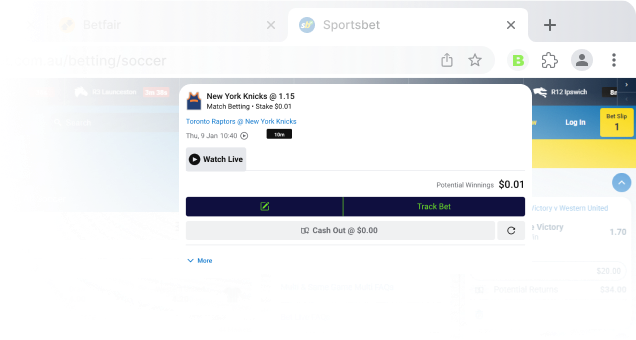
The Best Way To Track Your Bets
Built for matched bettors. Optimise your strategy, stay profitable.
Questions & Answers
Didn't find the answer to your question? Ask BetTrackr AI below, or send us an email and we will answer as soon as possible.
- Download the Extension Files: Download the BetTrackr Chrome extension files
- Extract the Files: Extract the '.zip file' to a location on your computer.
- Open Chrome: Launch the Google Chrome browser on your computer and navigate to chrome://extensions/
- Enable Developer Mode: On the Extensions page, toggle the switch for Developer mode in the top-right corner.
- Load the Unpacked Extension: Click the Load unpacked button. In the file dialog that appears, navigate to the location where you extracted the extension files and select the folder containing the extension's source code. Click Select Folder.
- Confirm Installation: The extension should now be installed and visible on your Extensions page. You may see an icon for the BetTrackr extension in the top-right corner of the Chrome window.
- Start Using the Extension: Click on the extension icon to login and start tracking your bets on your favourite bookmaker websites!